Fine-Tuning with ms-swift
Quickly Use ms-swift to Fine-Tune Open-Source Models
When a general model cannot directly meet specific business needs, you can use your own business data to fine-tune the model, allowing it to further learn specific tasks and output methods.
Take e-commerce entity recognition as an example. We need the model to identify product names, brand names, and model numbers from text, providing the corresponding category and location. The model may be very knowledgeable about these products, but in actual use, the extracted information must not be missing, the fields must be standardized, and the output format must be stable.
If the task and output requirements are already clear, and you have organized examples, you can try using this data for fine-tuning, allowing the model to learn the work we want it to do. As for whether to update all parameters and whether the available GPUs are sufficient, you need to choose based on the task and resources.
Below, we use ms-swift to walk through a LoRA fine-tuning process, covering data preparation, training, weight merging, and inference.
What Does Fine-Tuning Actually Change in the Model?
General large models already possess strong capabilities in language understanding, knowledge Q&A, text generation, and other general tasks. However, in actual business scenarios, the performance of general models may not directly meet specific requirements.
For example, we want the model to accurately complete certain information extraction tasks, output results in a specified format, or answer specific questions in a unified way. For these needs, we can use specific data to train on the basis of an existing model, so that the model further learns the corresponding task requirements and response methods. This process is called model fine-tuning.
Fine-tuning is not retraining a model from scratch, but further adjusting it on the basis of its existing capabilities to make it more suitable for specific application scenarios. Compared with training a large model from scratch, fine-tuning usually requires less data and computing resources.
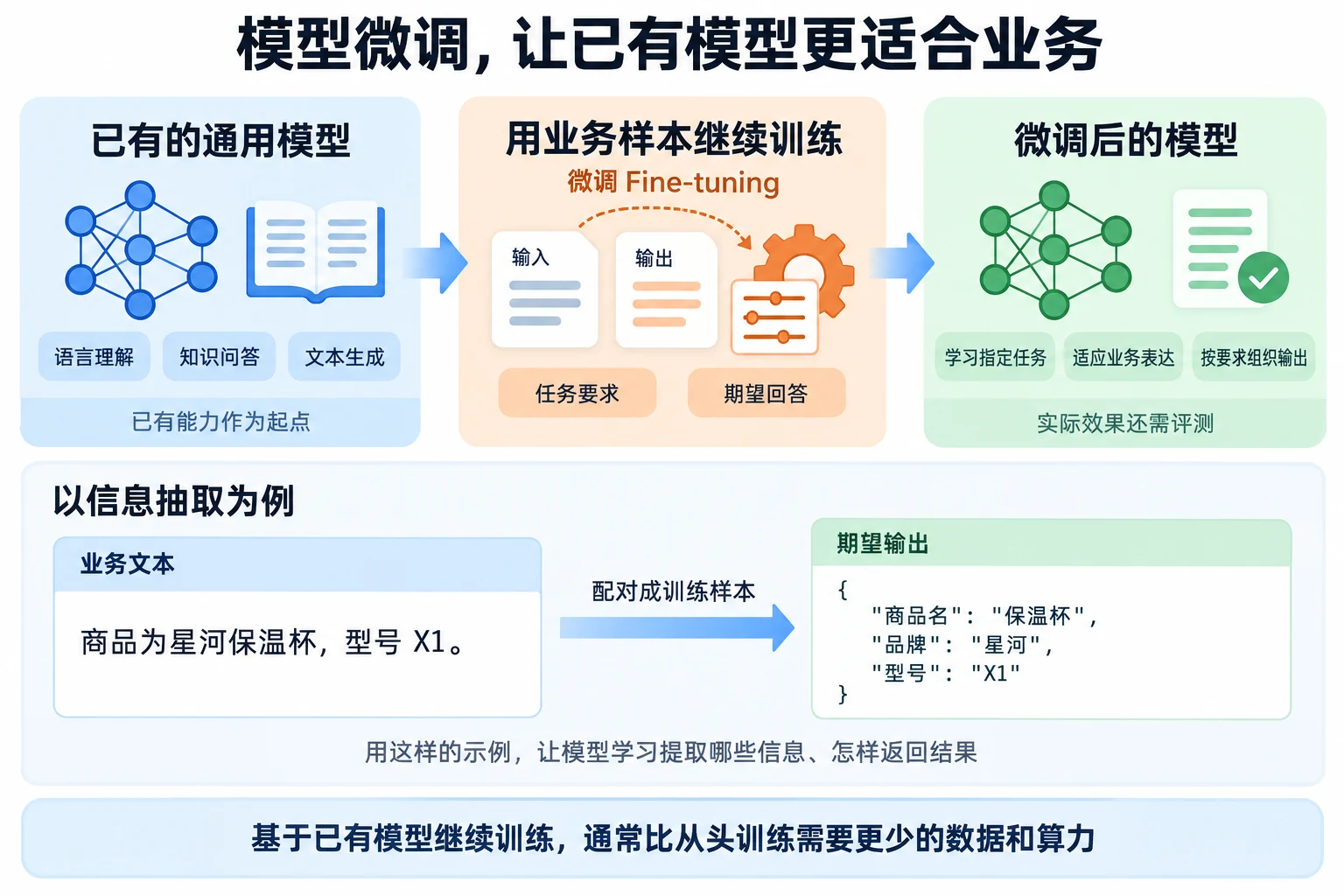
Currently, the most common method in large model fine-tuning is SFT (Supervised Fine-Tuning). SFT uses data with standard answers to train the model. Each training data entry usually contains an input and its corresponding output, allowing the model to learn what kind of results to generate given an input. For example, in information extraction tasks, you can use a text segment as input and the correct field extraction results as output. SFT is suitable for tasks where clear training samples can be prepared, such as text classification, information extraction, Q&A, and fixed-format generation.
In addition to SFT, large model training can also use Reinforcement Learning (RL). Unlike SFT which directly provides standard answers, reinforcement learning mainly uses reward signals to evaluate the quality of model-generated results and continuously adjusts the model's output behavior based on reward results. Both SFT and reinforcement learning belong to the post-training phase of large models. Post-training refers to a series of training conducted after the model completes large-scale pre-training, aimed at further improving instruction following, reasoning, and specific task capabilities. Large model training typically first uses SFT to learn how to complete tasks according to instructions, then combines reinforcement learning and other methods to further optimize the model's answer quality and behavioral performance.
Full Parameters, LoRA, and QLoRA: What's the Difference?
Depending on the training method and hardware resources, you can choose LoRA, QLoRA, or full parameter fine-tuning. Different methods have certain differences in the number of training parameters, GPU memory usage, and computational costs.
-
Full Parameter Fine-Tuning: During training, all parameters of the model are updated, so the model can make more thorough adjustments. Full parameter fine-tuning requires significantly more GPU memory and computing resources, resulting in higher training costs.
-
LoRA Fine-Tuning (Low-Rank Adaptation): To reduce the hardware resource requirements for large model fine-tuning, LoRA's core idea is to freeze the pre-trained model weights and inject trainable rank decomposition matrices into each layer of the Transformer architecture, thereby significantly reducing the number of trainable parameters for downstream tasks. During training, only the original model parameters need to be frozen, and the dimension-reduction matrix A and dimension-increase matrix B are trained. A schematic diagram of LoRA is shown below.
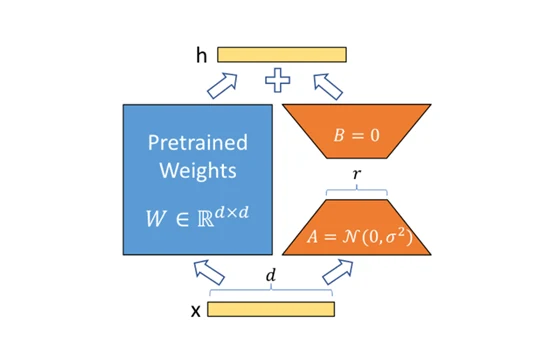
Specifically, assuming the pre-trained matrix is $W_0 \in \mathbb{R}^{d \times k}$, its update can be expressed as:
W = W_0 + \Delta W = W_0 + BA
Where $\Delta W$ represents the weight changes that need to be learned during fine-tuning:
B \in \mathbb{R}^{d \times r}, \quad
A \in \mathbb{R}^{r \times k}, \quad
r \ll \min(d,k)
A and B are new parameters added by LoRA that participate in training. After model training, you get a separate LoRA Adapter file that saves the parameters from this fine-tuning. When using it, you need to load both the base model and the corresponding Adapter.
- QLoRA Fine-Tuning (Quantized LoRA): LoRA mainly reduces the resource overhead from training parameters, but the base model itself still needs to be loaded into GPU memory. If the model is large, loading the base model may still consume a lot of GPU memory. To further reduce GPU memory requirements, you can use QLoRA fine-tuning.
The related model architecture is shown below. As you can see, QLoRA is an improvement on LoRA, and the main improvement is using 4-bit precision and paged optimization together to reduce GPU memory consumption.
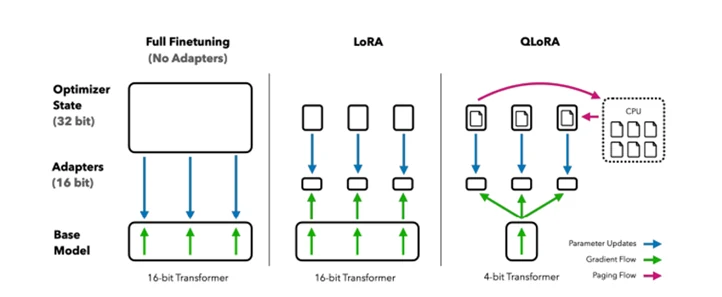
QLoRA can be simply understood as a combination of quantization and LoRA. It quantizes the base model at lower precision. QLoRA's main innovations include:
-
4-bit NormalFloat (NF4): NF4 is a new data type that is information-theoretically optimal for normally distributed weights;
-
Double Quantization: Double quantization reduces average memory usage by re-quantizing already quantized constants;
-
Paged Optimizers: Paged optimizers help manage memory peaks and prevent out-of-memory errors during gradient checkpointing.
How to Choose a Fine-Tuning Method: Start with the Task and GPU
The choice of fine-tuning method mainly requires considering model scale, task requirements, GPU resources, and training costs. Different methods have their own applicable scenarios — it's not necessarily true that updating more model parameters leads to better fine-tuning results. For most fine-tuning tasks, you can try LoRA first. LoRA only requires training a small number of new parameters, has relatively low requirements for GPU memory and computing resources, and the resulting Adapter files are also relatively small, making them easy to save.
If the base model is large, even using LoRA may not leave enough GPU memory for training after loading the model. In this case, you can further consider QLoRA. QLoRA reduces the base model's GPU memory usage through quantization, allowing larger models to be fine-tuned with limited GPU resources. QLoRA is more suitable for scenarios with large model scales and limited GPU memory.
If GPU resources are relatively sufficient and the task requires more thorough model adjustments, you can consider full parameter fine-tuning. Since all model parameters need to be updated during training, full parameter fine-tuning has higher requirements for GPU memory, computing resources, and training data, and the cost of training and saving models is also greater, so you need to determine whether it's necessary based on the actual task.
In actual projects, we can first verify the effect at a lower cost, then choose whether to increase training costs based on actual needs. If LoRA can already achieve the expected results, there is usually no need to choose full parameter fine-tuning just to update more parameters.
Using ms-swift to Complete a Fine-Tuning Run
What Work Can ms-swift Save Us?
ms-swift (SWIFT, Scalable lightWeight Infrastructure for Fine-Tuning) is an open-source large model training and deployment framework from the ModelScope community. It mainly targets large language models and multimodal large models, providing a complete set of tools from model training and fine-tuning to inference, evaluation, and deployment.
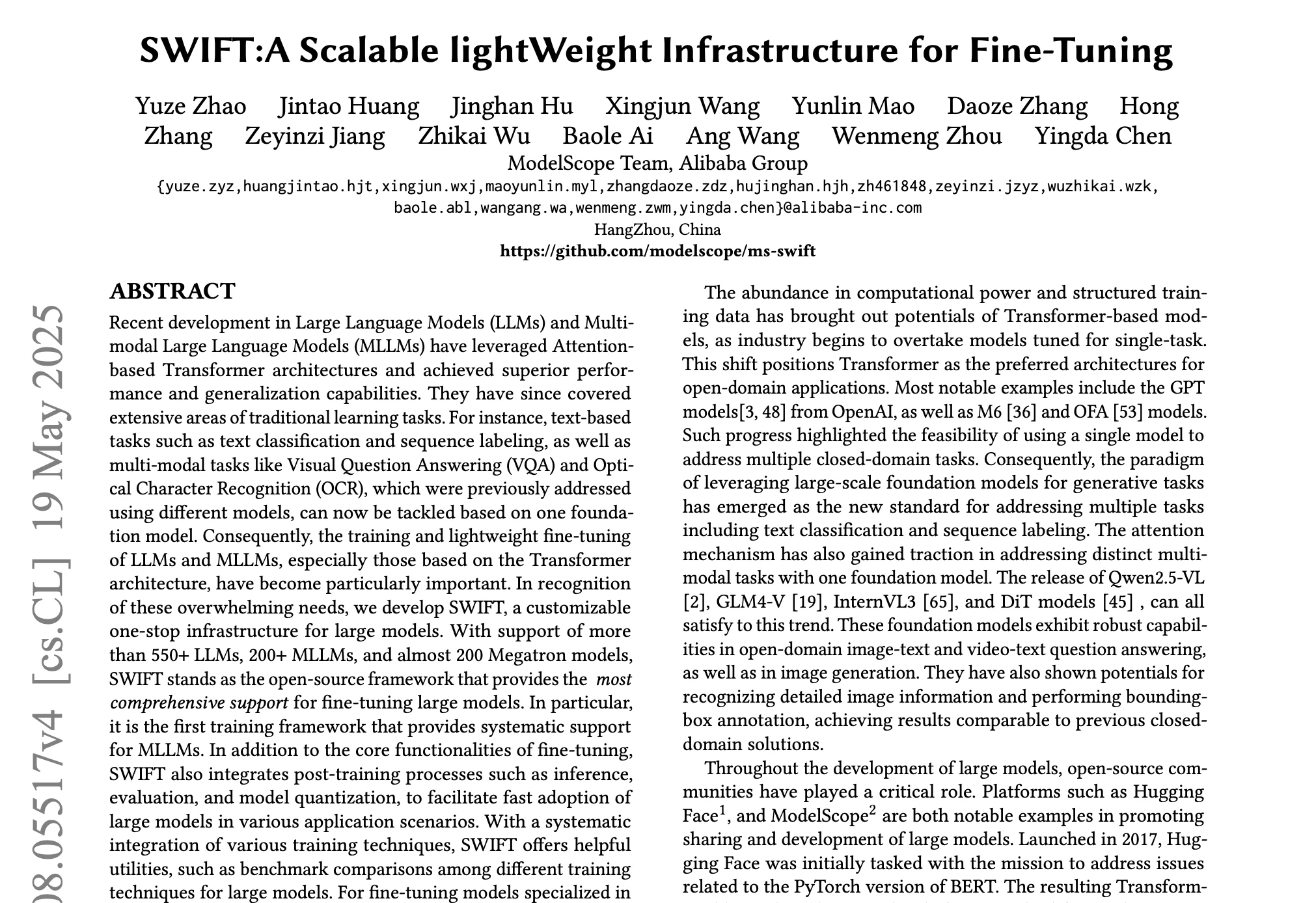
Currently, it supports mainstream large language models such as Qwen, DeepSeek, Llama, GLM, and InternLM, as well as multimodal models like Qwen-VL and InternVL. It also supports training for tasks such as Embedding, Reranker, and text classification.
You can find more usage methods at ms-swift.
In addition to training, ms-swift also provides a relatively complete model usage workflow. After training, you can directly use swift infer for model inference, or deploy the model as an OpenAI-compatible API service through swift deploy. For inference and deployment, you can also combine inference engines like vLLM, SGLang, and LMDeploy for acceleration.
For beginners, one of ms-swift's features is that it encapsulates many complex configurations in the large model training process. You can complete a model fine-tuning by specifying the base model, training data, fine-tuning method, and training parameters through command-line arguments. In the following experiment, we will use ms-swift to complete a complete model fine-tuning workflow, including preparing training data, starting LoRA training, viewing training results, merging LoRA weights, and loading the fine-tuned model for inference and deployment.
Hands-On Training with an Entity Recognition Task
Below, we use an entity recognition task as an example to demonstrate the complete model fine-tuning workflow in the ModelScope Notebook environment, including data preparation, model training, and post-fine-tuning model inference. Through this example, you can learn how to use ms-swift to complete large model fine-tuning from scratch. This experiment continues to use the ubuntu22.04-cuda12.8.1-py312-torch2.10.0-1.39.0 image as the runtime environment.

- Check whether ms-swift is already installed in the environment. Note that the package name is
ms_swift.
!pip3 list |grep ms_swift
If you see output in the following format, ms-swift is already installed:

If not installed, run:
!pip3 install ms-swift
-
Data preparation. This experiment uses open-source data for e-commerce entity recognition. The dataset contains four entity types:
HCCX(product name),HPPX(brand name),XH(product model), andMISC(other entities including country, size/capacity, person, work, and activity names). -
First create a directory called
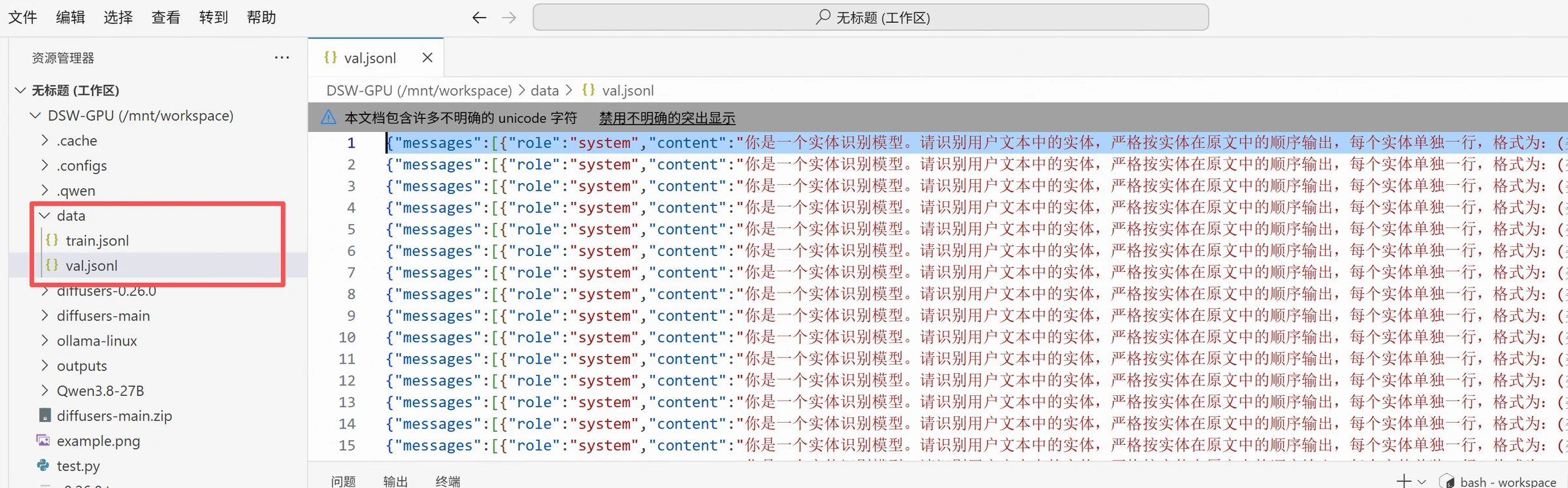
data, then right-click to upload the data to the folder. The data format is as follows. This task only requires the model to output entity categories, entities, and their starting positions in the text. The data is split into training and test sets, withtrain.jsonlcontaining 5,400 entries andval.jsonlcontaining 600 entries.
{"messages":[{"role":"system","content":"You are an entity recognition model. Please identify entities in the user's text. Output entities strictly in their order of appearance in the original text, each entity on a separate line in the format: (type, entity text, starting position). Starting position begins at 0; type can only be one of HCCX, HPPX, MISC, XH. When there are no entities, output only: No entities. Do not output explanations, Markdown, or other content."},{"role":"user","content":"push bb skincare guasha l back therapy olive oil full body back open foot body oil m oil 5 massage oil massage essence 00"},{"role":"assistant","content":"(HCCX,olive oil,10)\n(HCCX,massage oil,20)\n(HCCX,oil,24)\n(HCCX,oil,27)"}]}
Directory structure as follows:
- Model training. This section uses
Qwen/Qwen3-0.6Bfor fine-tuning. Enter the following command directly in the terminal to start training:
!CUDA_VISIBLE_DEVICES=0 swift sft \
  --model Qwen/Qwen3-0.6B \
  --dataset data/train.jsonl \
  --val_dataset data/val.jsonl \
  --tuner_type lora \
  --target_modules all-linear \
  --lora_rank 16 \
  --lora_alpha 32 \
  --lora_dropout 0.05 \
  --torch_dtype bfloat16 \
  --num_train_epochs 2 \
  --per_device_train_batch_size 4 \
  --per_device_eval_batch_size 4 \
  --gradient_accumulation_steps 4 \
  --learning_rate 1e-4 \
  --warmup_ratio 0.05 \
  --max_length 512 \
  --eval_strategy steps \
  --eval_steps 100 \
  --save_strategy steps \
  --save_steps 100 \
  --save_total_limit 3 \
  --logging_steps 10 \
  --load_from_cache_file true \
  --dataset_num_proc 4 \
  --dataloader_num_workers 4 \
  --output_dir output/qwen3_0_6b_ner_lora
Core parameter descriptions:
| Parameter | Description |
| --model Qwen/Qwen3-0.6B | Use Qwen3-0.6B base model |
| --tuner_type lora | Use LoRA fine-tuning |
| --target_modules all-linear | Add LoRA to all linear layers |
| --lora_rank 16 | LoRA capacity |
| --lora_alpha 32 | LoRA scaling factor |
| --num_train_epochs 2 | Number of training epochs |
| --per_device_train_batch_size 4 | 4 data entries per step per GPU |
| --gradient_accumulation_steps 4 | Accumulate 4 steps before updating parameters |
| --learning_rate 1e-4 | LoRA learning rate |
| --max_length 512 | Maximum length per sample |
| --eval_steps 100 | Validate every 100 steps |
| --save_steps 100 | Save every 100 steps |
| --save_total_limit 3 | Keep at most 3 checkpoints |
| --output_dir | Model and log save path |
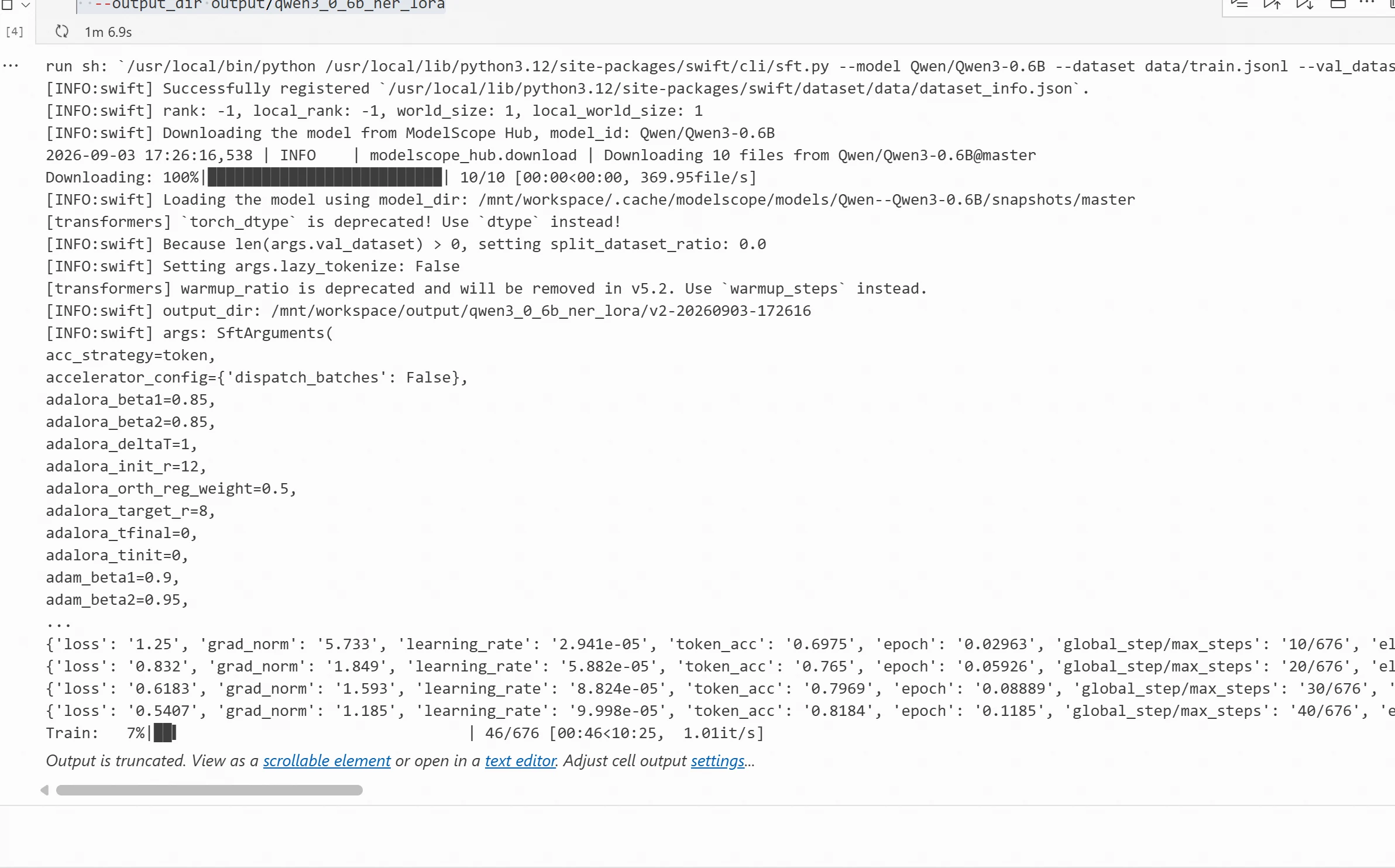
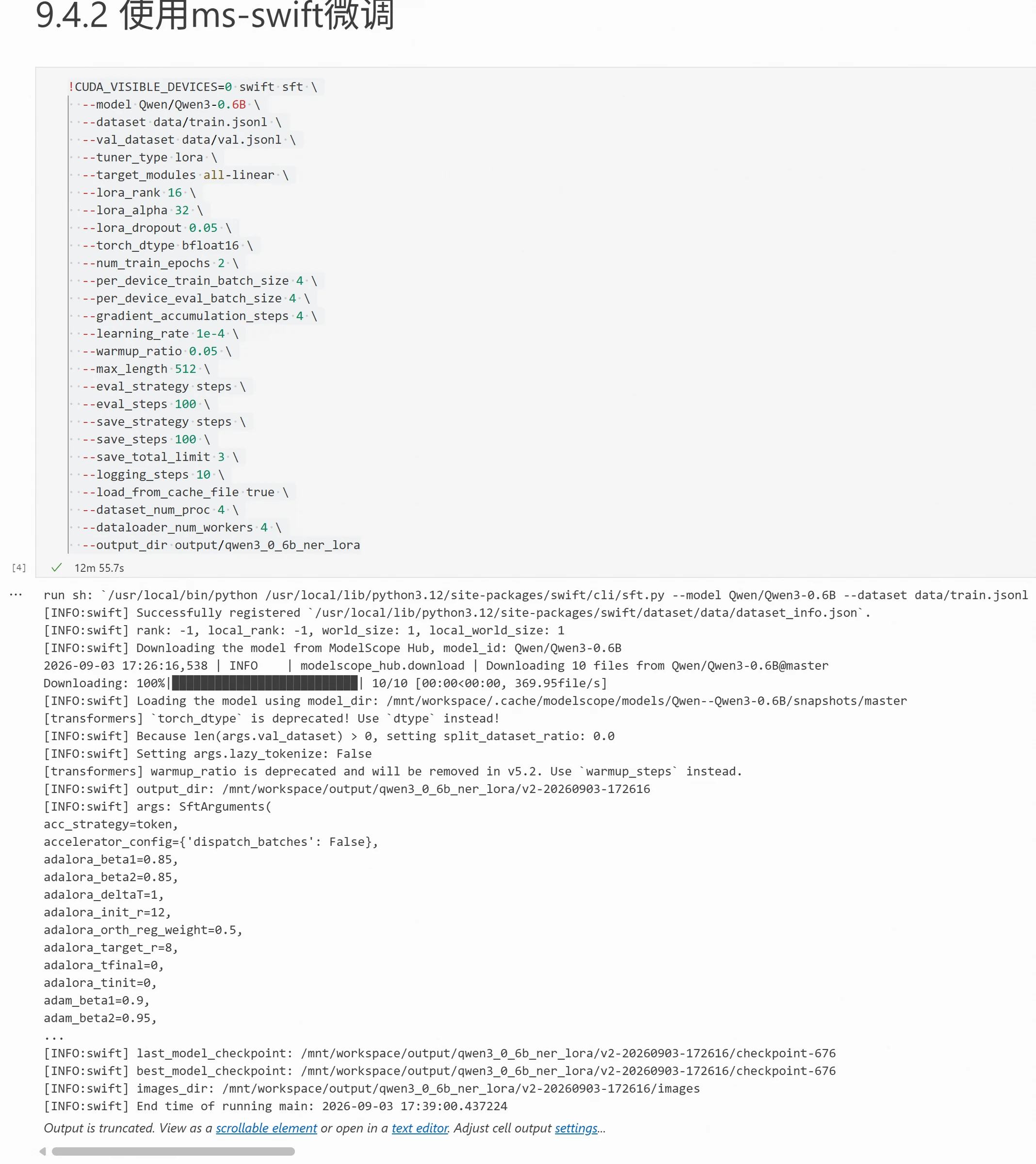
After starting training, ms-swift will continuously output current training information as shown below:
Training Is Complete — How Do We Use the Model?
Merging LoRA Weights Back into the Base Model
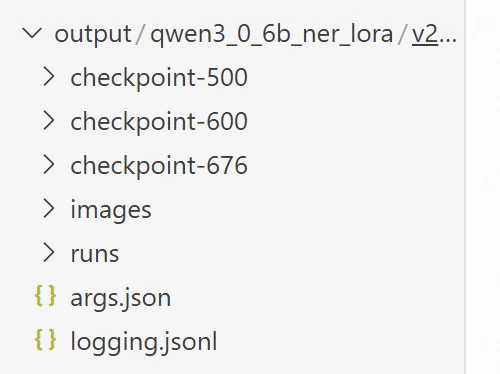
After LoRA training completes, the corresponding LoRA Adapter is saved. The Adapter is not a complete large model, so you still need to load the original base model when using it. Through the output_dir in the training script, you can see the checkpoints and corresponding Adapter files in the directory. In actual deployment, you can merge the LoRA Adapter into the base model to generate a complete model, which is more convenient for offline deployment or model migration. The directory structure after model training is as follows:
Model merge command:
!CUDA_VISIBLE_DEVICES=0 swift export \
  --adapters output/qwen3_0_6b_ner_lora/v2-20260903-172616/checkpoint-676 \
  --merge_lora true \
  --output_dir output/qwen3_0_6b_ner_merged
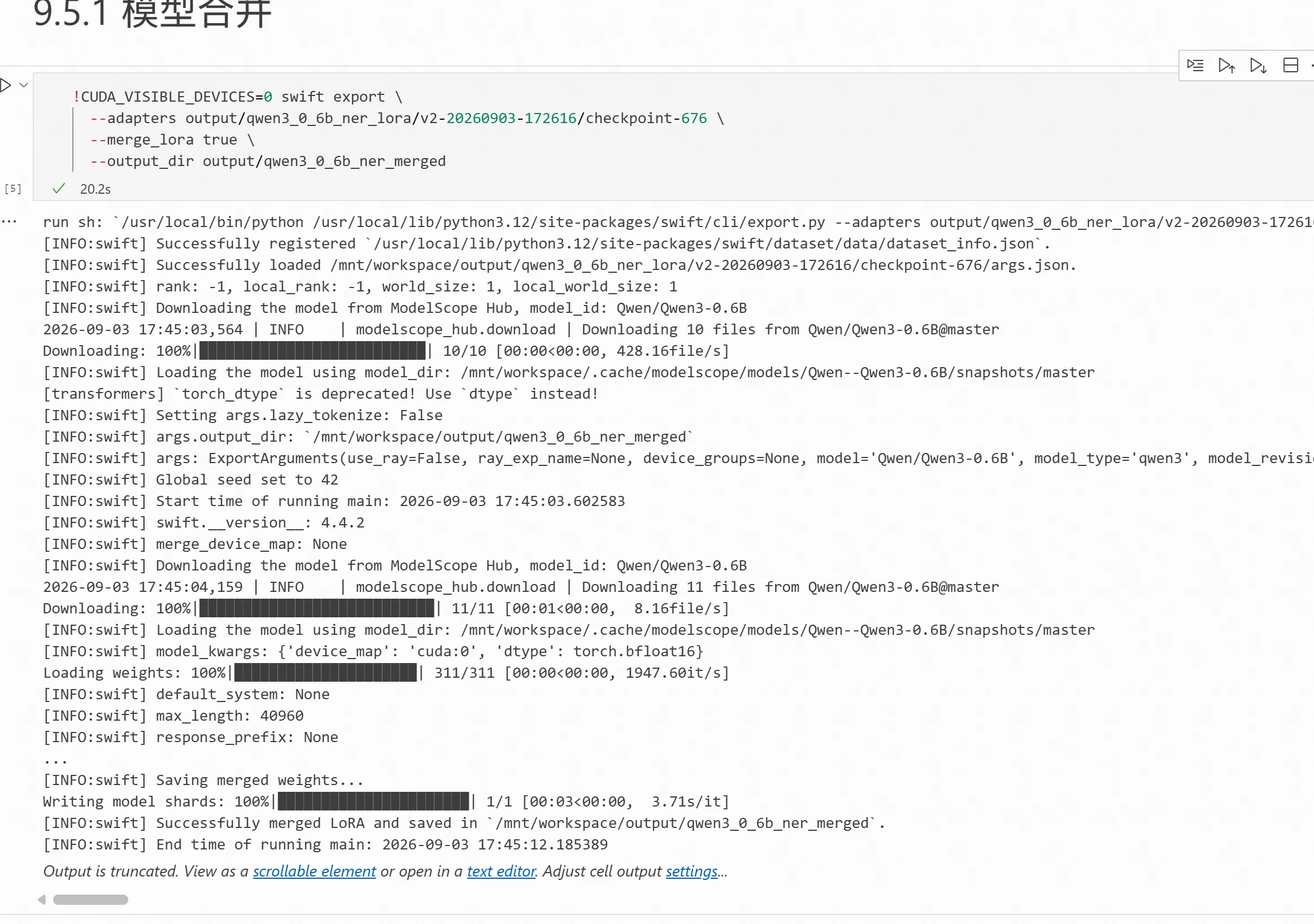
Where --adapters specifies the path to the trained LoRA checkpoint, --merge_lora true indicates merging LoRA parameters into the base model, and --output_dir specifies the save directory for the merged model.
Execution result:
Loading the Fine-Tuned Model and Testing the Effect
After merging, you can directly load the generated complete model for inference. For convenience of application calls, you can also start the model as an OpenAI-compatible interface, accessing the fine-tuned model through API. This is also a persistent service that needs to be started in the terminal. You can refer to Chapter 7 for how to start commands in the terminal. The startup command is as follows:
CUDA_VISIBLE_DEVICES=0 swift deploy \
  --model output/qwen3_0_6b_ner_merged \
  --load_args false \
  --infer_backend vllm \
  --enable_thinking false \
  --host 0.0.0.0 \
  --port 8000 \
  --served_model_name qwen3-0.6b-ner \
  --api_key 123 \
  --vllm_gpu_memory_utilization 0.7 \
  --vllm_max_model_len 1024 \
  --max_new_tokens 128
Parameter descriptions:
| Parameter | Description |
| swift deploy | Start ms-swift's OpenAI-compatible service |
| --model | Specify the merged complete model directory |
| --load_args | Don't load args.json parameters from the model directory |
| --infer_backend | Use vLLM inference engine |
| --enable_thinking | Disable Qwen3 thinking mode |
| --host | Interface IP |
| --port | Port |
| --served_model_name | Set the interface access model name |
| --api_key | Set the interface access key |
| --vllm_gpu_memory_utilization | Model uses approximately 70% GPU memory |
| --vllm_max_model_len | Maximum total token count |
| --max_new_tokens | Maximum output length |
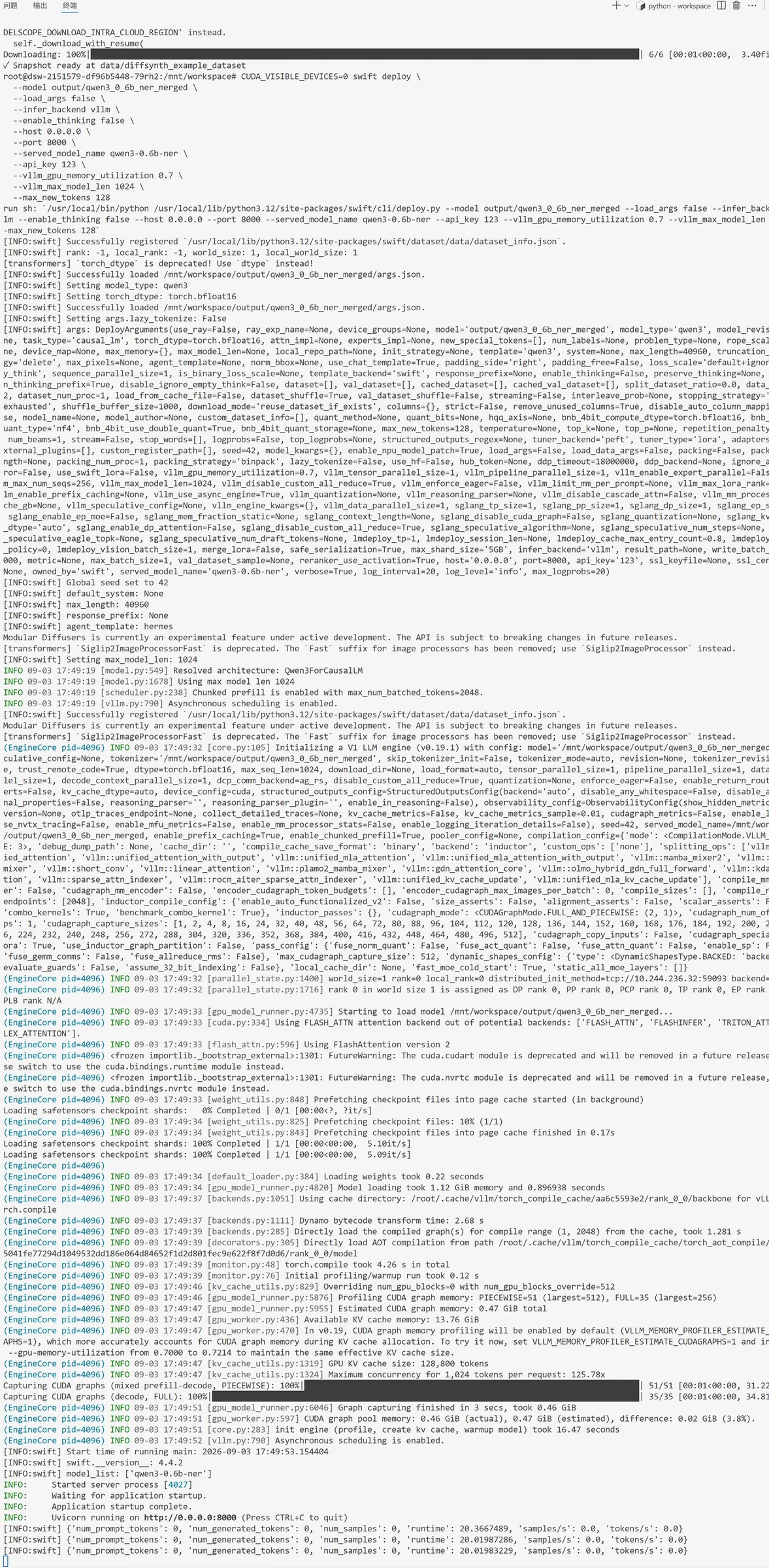
After the model starts, the result is as follows:
After the model starts, you can test connectivity through the interface. Code as follows:
import json
import requests

url = "http://127.0.0.1:8000/v1/chat/completions"

headers = {
    "Authorization": "Bearer 123",
    "Content-Type": "application/json"
}

payload = {
    "model": "qwen3-0.6b-ner",
    "messages": [
        {
            "role": "system",
            "content": "You are an entity recognition model. Please identify entities in the user's text. Output entities strictly in their order of appearance in the original text, each entity on a separate line in the format: (type, entity text, starting position). Starting position begins at 0; type can only be one of HCCX, HPPX, MISC, XH. When there are no entities, output only: No entities. Do not output explanations, Markdown, think tags, or other content."
        },
        {
            "role": "user",
            "content": "3539,2017 fire-fighting non-slip wear-resistant tall emergency rescue boots"
        }
    ],
    "temperature": 0,
    "max_tokens": 128
}

try:
    response = requests.post(url, headers=headers, json=payload, timeout=30)
    response.raise_for_status()

    result = response.json()

    output_text = result["choices"][0]["message"]["content"]
    print("Recognition result:")
    print(output_text)

except requests.exceptions.RequestException as e:
    print(f"Request failed: {e}")
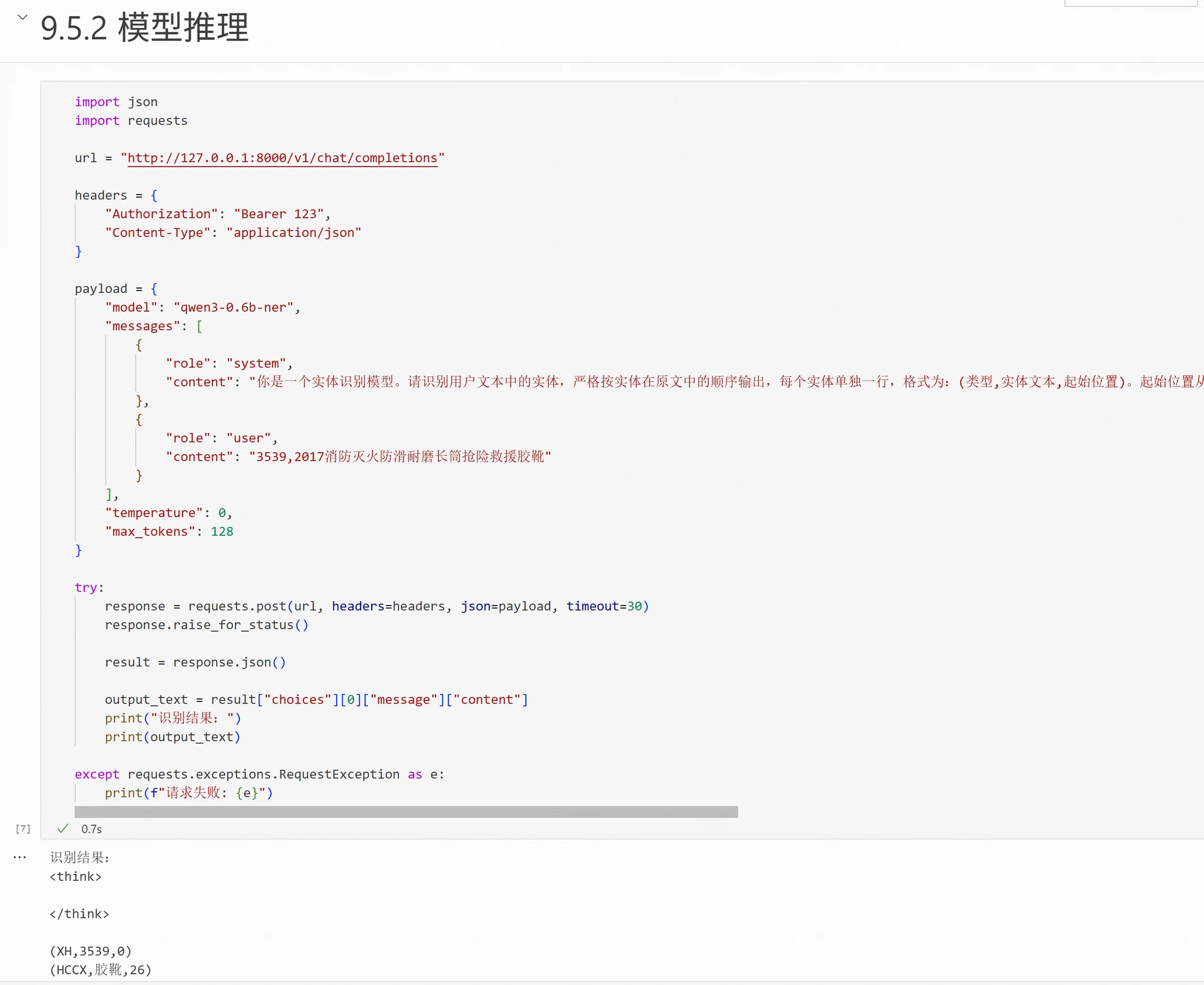
Model output result. We can also use regex to remove the think tags:
All experiment data and code for this chapter can be found at: https://modelscope.cn/gallery/liucong/ab458cbd-b47f-4830-91b6-314ea2036fc6
Discussion
Sign in to join the discussion