As Agent applications become increasingly complex, developers need to handle tool invocation, knowledge integration, state management, and multi-Agent collaboration. Developing all these capabilities from scratch would not only be labor-intensive but also make inter-module connections and runtime control quite complex.
Agent frameworks encapsulate these common capabilities, providing unified implementation approaches for Agent development. Below are several representative Agent development frameworks.
LangChain Framework
Launched in 2022, LangChain is one of the earlier open-source frameworks for building large model applications. Initially focused on organizing large models, prompts, and external data components, it gradually expanded to include tool invocation and Agents. Currently, LangChain has made Agents a core component of the framework, providing models, tools, and middleware components for rapidly building Agents with tool invocation capabilities.
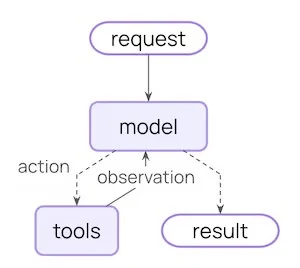
LangChain's core execution method forms a loop between the large model and tools. The model receives user tasks and available tools, then decides based on current information whether to generate a result directly or call a tool. If a tool call is chosen, the framework executes the corresponding tool and returns the result to the model. The model then makes further decisions based on new information until no more tool calls are needed and a final result is generated. The official documentation calls this the Agent Loop, as shown below.
For example, you can configure a travel assistant with weather query, map lookup, and web search tools. When a user asks "Help me plan a day trip to Hangzhou tomorrow," the model can determine it needs to check weather and attraction information, call the corresponding tools to get results, and combine them to complete the itinerary.
Tools are an important way to implement external capabilities. They are essentially callable functions with clear inputs and outputs, used to fetch real-time data, execute code, query databases, or operate external systems. After developers provide the necessary tools to an Agent, the model decides when to call which tool and what parameters to provide based on the current task.
This component-based approach is a key feature of LangChain. LangChain provides relatively unified interfaces for different models and tools, allowing developers to combine these components within a single framework without handling different calling logic for each model and external capability. This makes it well-suited for quickly building tool-calling Agents and for beginners to understand basic Agent operation.
LlamaIndex Framework
Launched in 2022, LlamaIndex was originally designed to solve the connection problem between large models and external data. It provides data loading, indexing, retrieval, and querying capabilities, enabling external data like enterprise documents and databases to be integrated into large model applications. On this foundation, LlamaIndex has gradually added Agent and Workflow features, allowing Agents to use this data for more complex tasks.
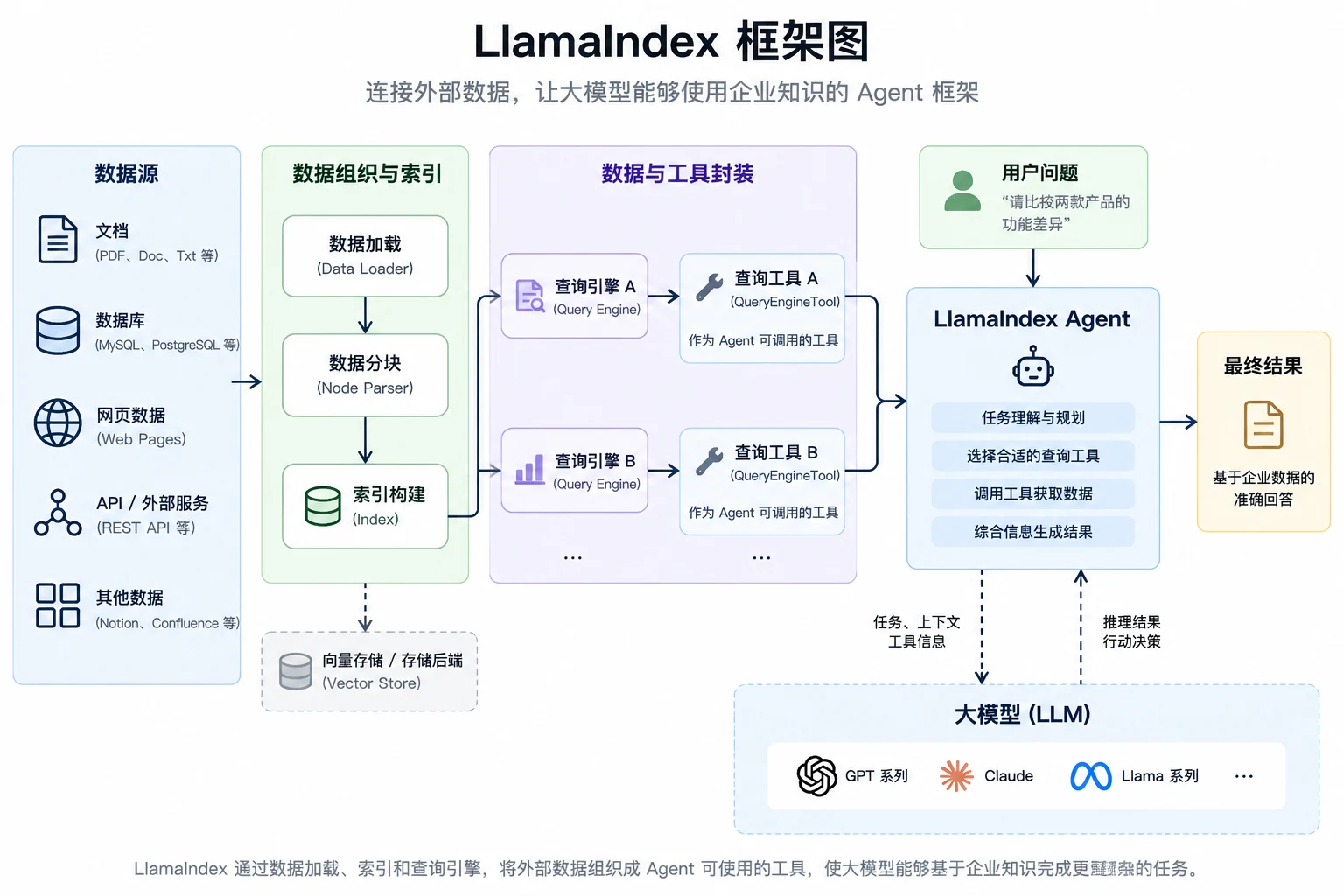
Large models themselves do not understand enterprise product documentation, business data, and databases. When an Agent needs to use this data to complete tasks, it must first find information relevant to the current task. LlamaIndex can load, organize, and index external data, then use components like Retriever and Query Engine for retrieval and querying. The Query Engine can receive natural language questions and find relevant data from the index, and can be packaged as a tool that Agents can call. As shown below, after receiving a user task, an Agent can select the appropriate query tool to fetch information, then analyze and generate results with the large model. This approach avoids putting all external data into context, instead querying and using relevant data on demand.
For example, configure an enterprise analytics Agent with product documentation and business data query tools. When a user requests comparison of two products' features, the Agent calls the product information query tool. If the user then asks about sales performance, it calls the business data query tool. For more complex questions, the Agent can call multiple data query tools in sequence, combining results from different sources to complete the task.
LlamaIndex was not originally designed specifically for Agent development. Its strength lies in data and knowledge processing. It can not only enable large models to retrieve documents but also organize different data and query capabilities into tools that Agents can select and use. It is well-suited for knowledge base Q&A, document analysis, multi-source queries, and Agent applications that need to access large amounts of enterprise documents, knowledge bases, or structured data.
AutoGen Framework
AutoGen was released by Microsoft Research in 2023 and is a representative open-source framework in the multi-Agent development space. With Multi-Agent Conversation as its core concept, it enables multiple Agents to collaborate through dialogue to complete tasks.
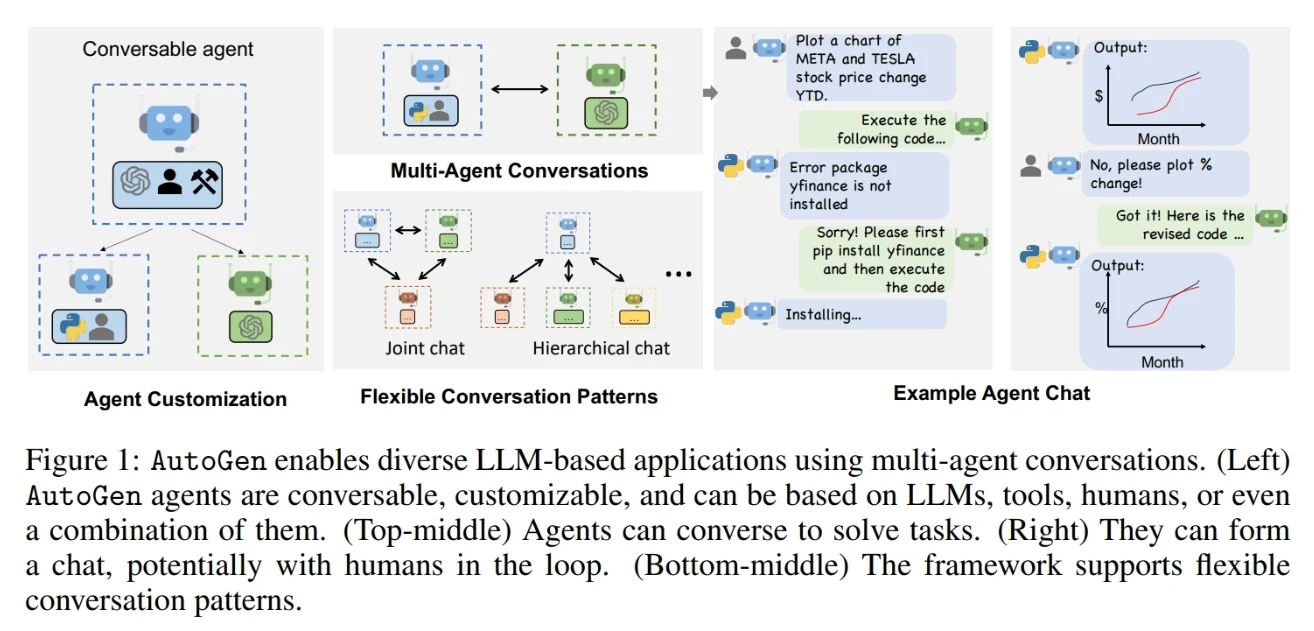
AutoGen designs Agents as conversational and customizable entities. An Agent can consist of a large model, tools, human input, or a combination of these capabilities. Developers can also define interaction methods between Agents, allowing different Agents to form different conversation patterns. The overall design is shown below.
This diagram reflects two important design concepts of AutoGen. First, different Agents can have different capabilities. Second, multiple Agents can be organized through different Conversation Patterns to communicate and collaborate in various ways.
For example, in a software development task, you can set one Agent to analyze requirements, another to write code, and a third to review results. After the coding Agent generates code, it sends the result to the review Agent. If issues are found, the review Agent can provide feedback to the coding Agent for further modification until the task requirements are met.
Currently, AutoGen primarily provides capabilities at two levels: AgentChat and Core. AgentChat is a high-level interface for building single-Agent and multi-Agent applications, providing components like Agent and Team. Developers can organize multiple Agents into Teams and use methods like turn-taking or dynamic next-Agent selection to organize collaboration. Core uses an event-driven approach to provide underlying capabilities for more flexible and extensible multi-Agent systems.
AutoGen's characteristic is that it focuses on communication and collaboration between Agents as a framework design priority, making it suitable for complex tasks requiring multiple Agents to divide work. Multi-Agent systems require additional design of Agent roles and collaboration methods; for simple tasks, using multiple Agents is usually unnecessary.
CrewAI Framework
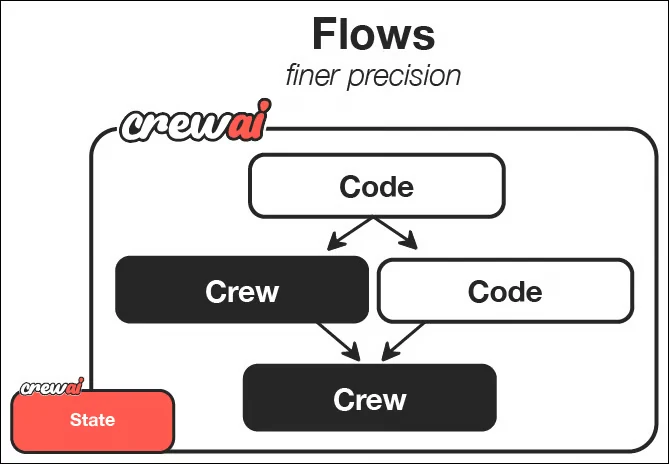
CrewAI also targets multi-Agent collaboration but adopts an organizational approach closer to real-world teams. Developers can define roles, goals, and tools for different Agents, then organize these Agents to complete work through tasks and processes. CrewAI primarily provides two organizational methods: Crews, emphasizing autonomous collaboration between Agents, and Flows, emphasizing structured process control.
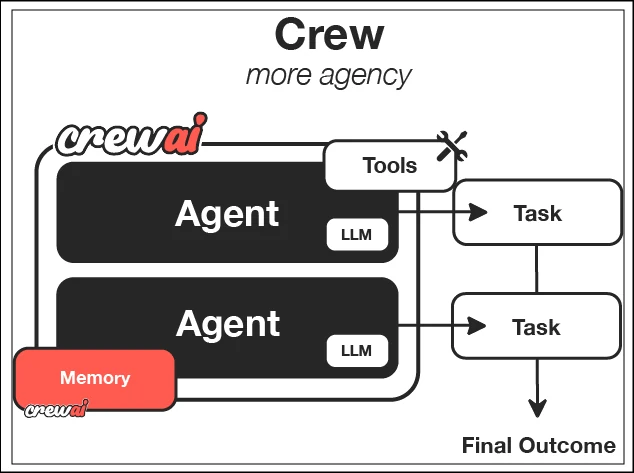
The framework structure provided by CrewAI is shown below.
In Crews, Agents can be understood as team members with specific responsibilities, Tasks represent specific work to be completed, Processes define how Agents and Tasks execute, and the Crew organizes these Agents and Tasks together to achieve the final goal.
For example, to complete an industry research report, you can create a research Agent, a writing Agent, and a review Agent. The research Agent finds and organizes materials, the writing Agent forms the report based on research results, and the review Agent checks the report for issues. Different Agents take on different responsibilities and complete the entire work through task coordination.
Flows can organize task execution according to predetermined processes, supporting conditional logic, loops, and state management. Crews and Flows can also be combined, for example using a Flow to control the overall business process while calling a Crew for complex steps where multiple Agents collaborate.
CrewAI's characteristic is that it organizes multi-Agent collaboration through roles, tasks, and teams, with an overall design close to real-world team division. It is well-suited for multi-Agent applications with clear role and task boundaries, such as research, content generation, data analysis, and review scenarios.
LangGraph Framework
LangGraph was released by the LangChain team in 2024 as a low-level orchestration framework for building and managing long-running, stateful Agents. Unlike using pre-built Agents, LangGraph allows developers to explicitly define Agent execution structures, making it particularly suitable for Agents involving complex processes with state, branching, loops, and human intervention.
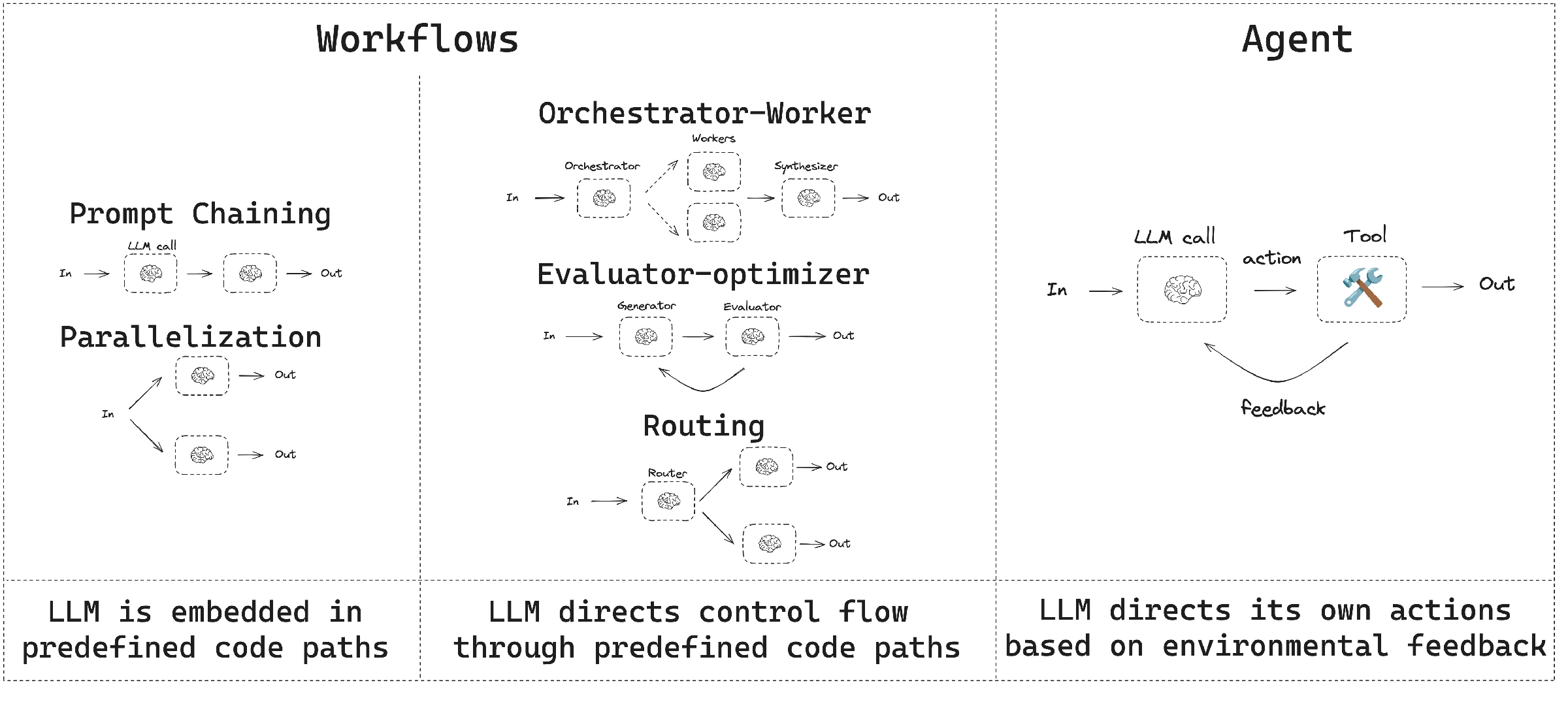
LangGraph can build both Workflows with relatively clear execution paths and Agents where the large model dynamically decides the next action. Workflows can predefine task execution paths and organize different steps through sequencing, parallelization, routing, and looping. Agents can dynamically decide the next action based on current state and tool return results. In practice, Workflows and Agents can also be combined, with Workflows determining the overall process and Agents handling steps requiring dynamic decisions.
The Workflow and Agent patterns supported by LangGraph are shown below.
To implement these different execution methods, LangGraph uses graphs to describe task execution processes, with three basic concepts: State, Node, and Edge. State stores information that needs to be shared during task execution; Node represents a specific processing step, such as calling the large model, retrieving knowledge, or executing tools; Edge connects different nodes and determines which node the task enters next.
For example, a knowledge Q&A Agent can first analyze user questions, then retrieve knowledge, generate answers, and check results. If the answer fails validation, it can re-enter the retrieval node through conditional branching. If validation passes, it enters the final output node. Throughout this process, user questions, retrieval results, and intermediate answers can all be stored in State and shared between different nodes.
This design differs from relying entirely on the large model to decide the next action. LangGraph allows predefining the general execution structure of tasks while using the large model for decision-making at nodes requiring judgment. This preserves the Agent's ability to dynamically judge based on actual conditions while also providing control over critical execution paths.
In addition to graph structure and state management, LangGraph provides capabilities like Durable Execution and Human-in-the-loop. Long-running tasks can save execution state and resume after interruption. Before important operations, the Agent can be paused to wait for human inspection or state modification before continuing. Therefore, LangGraph positions itself as a low-level orchestration framework for long-running, stateful Agents.
LangGraph provides fine-grained control over state and execution paths but requires more process design from developers. For simple tool-calling Agents, building complex graphs from the start is unnecessary. The LangChain team also recommends that those new to Agents or needing higher-level abstractions start with LangChain's Agents.
MS-Agent Framework
MS-Agent is an open-source lightweight Agent development framework from the ModelScope community, primarily targeting tasks requiring autonomous exploration and multi-step execution. It provides model invocation, tool integration, and multi-Agent collaboration capabilities, and can be used to build deep research, document analysis, and code generation applications.
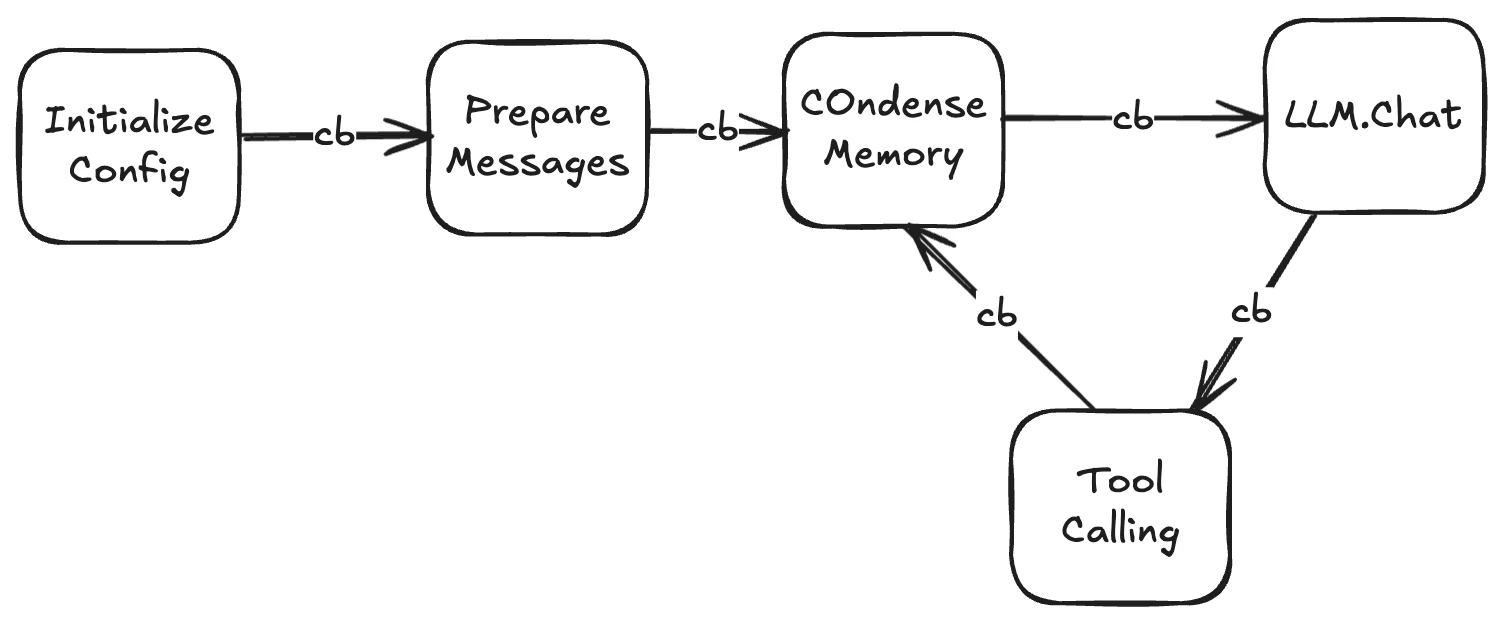
MS-Agent's foundational component is LLMAgent, which organizes large model conversations and tool invocation. Developers can specify the model, prompts, and tools through configuration files. After receiving a user task, LLMAgent provides the task and available tools to the large model, which then decides the next action. If tool calling is needed, the framework executes the corresponding operation and returns the result to the model for further processing, until the model generates a response without tool calls or reaches the maximum configured run count.
LLMAgent's basic execution flow is shown below. After completing configuration initialization and message preparation, the Agent loops between model invocation and tool execution, compressing context when needed. The "cb" in the diagram represents callbacks, where developers can add logging or other custom processing at corresponding stages.
Tool integration is an important capability of MS-Agent. The framework provides built-in tools for file read/write, code execution, and task decomposition, and supports integrating external tools through MCP (Model Context Protocol). Developers can reuse existing MCP services or write custom tools to enable Agents to access data and external systems needed for tasks.
For tasks requiring multi-step coordination, MS-Agent supports combining different Agents through workflows. LLMAgent handles steps requiring large model judgment and generation, while CodeAgent handles deterministic operations based on code execution. Developers can organize data analysis, processing, and result generation into a workflow and specify the execution relationships between steps through configuration files.
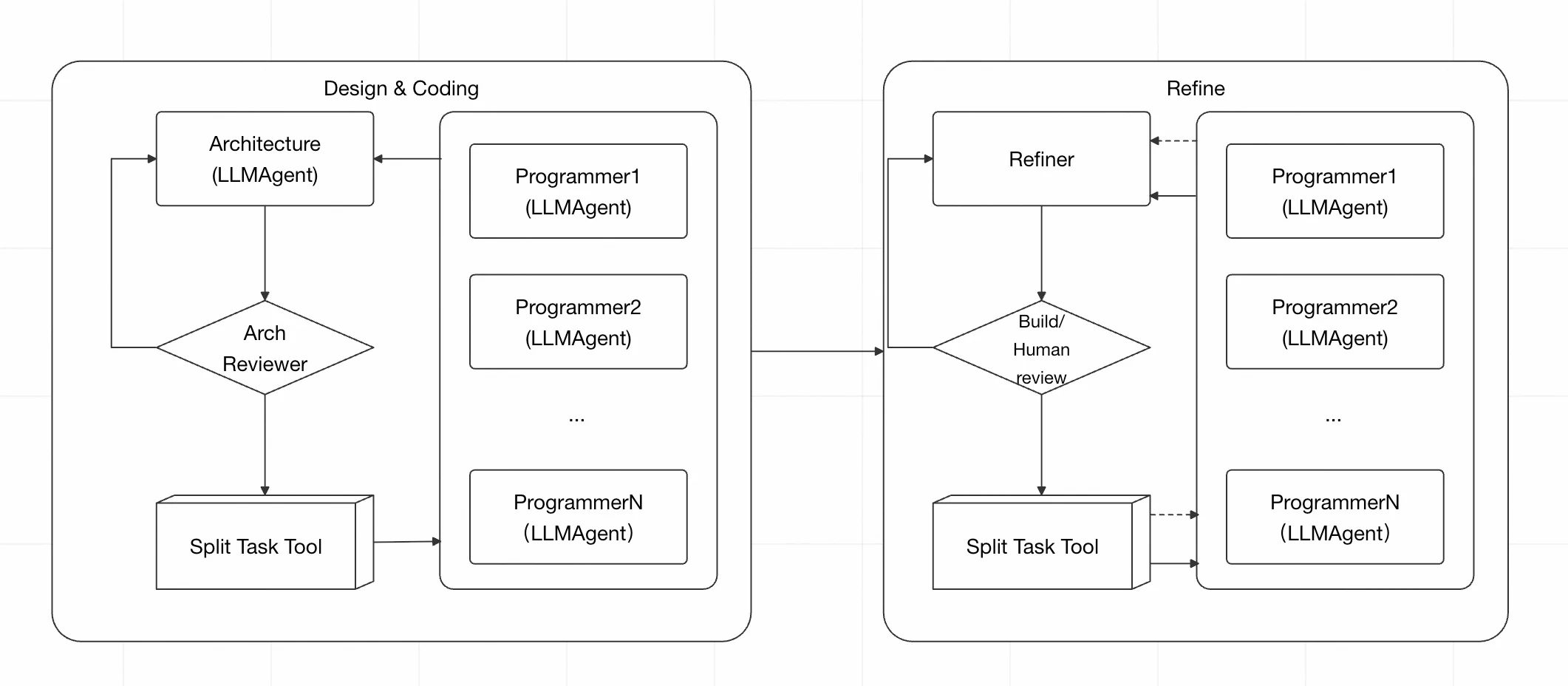
For example, MS-Agent's Code Genesis project provides a multi-Agent collaboration example for code generation, dividing the process into design/coding and inspection/optimization phases. The architecture Agent handles design, and the task decomposition tool distributes work to multiple coding Agents. In the optimization phase, modification tasks are decomposed based on build or human review feedback, with coding Agents continuing to process.
Agent SDK
In addition to using Agent development frameworks, some model providers also offer Agent development capabilities in the form of SDKs (Software Development Kits), packaging model invocation, tool calling, and task execution capabilities into interfaces, classes, and components to help developers create and run Agents in their own applications. Both Agent frameworks and Agent SDKs can be used to build Agents, with overlapping capabilities but different organizational approaches and focus areas. Below are two representative Agent SDKs.
OpenAI Agents SDK
In 2025, OpenAI released the OpenAI Agents SDK, which emphasizes building Agent applications with fewer core abstractions. Using Agent as the basic execution unit, it provides capabilities like tool invocation, task handoffs, runtime constraints, and execution tracing. Tools are used for data queries, code execution, API calls, and other external system operations. Handoffs allow the current Agent to transfer tasks to another Agent better suited for handling them. Guardrails check Agent inputs, outputs, and some tool executions. Tracing records model generation, tool calls, task handoffs, and Guardrail events during Agent execution.
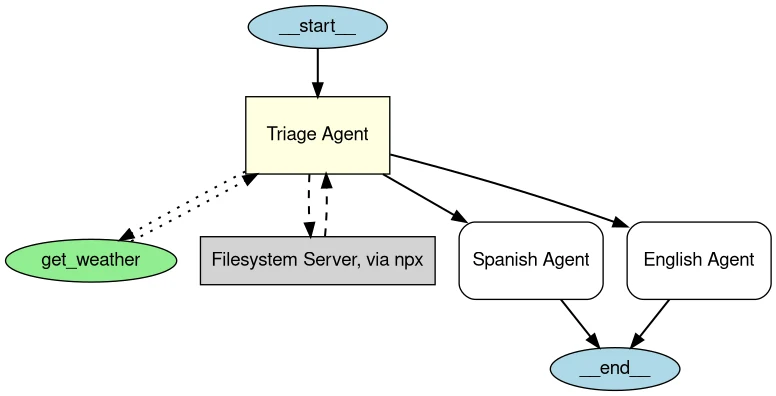
The OpenAI Agents SDK also provides Agent Visualization, which generates graph structures of the Agent and its connected Agents, Tools, and MCP Servers. Directed connections between Agents represent Handoffs, while connections between tools and Agents represent tool calls.
For example, in a customer service system, you can set up an entry Agent to identify user issues, then set up an order Agent, refund Agent, and FAQ Agent to handle different business types. When a user asks about a refund, the entry Agent can use Handoff to transfer the task to the refund Agent, which then calls order query and refund application tools as needed. Handoff is especially suitable for scenarios where different specialized Agents handle different tasks.
Guardrails and Tracing address the constraints and observation needs of real Agent operation. Guardrails can check at Agent input, final output, and before/after custom function tool execution. Tracing records model generation, tool calls, Handoffs, and Guardrail events during a single Agent run, helping developers understand which steps the Agent went through and where issues occurred.
The OpenAI Agents SDK's characteristic is that its core concepts are relatively focused. Developers can start with a single Agent and Tools, then gradually add multi-Agent collaboration, Guardrails, and Tracing. Compared to LangGraph, the design emphasis differs: LangGraph focuses more on fine-grained control of state and workflows, while the OpenAI Agents SDK centers on providing common capabilities around the Agent like tool invocation, task handoffs, runtime constraints, and execution tracing.
Claude Agent SDK
Claude Agent SDK is Anthropic's Agent development SDK, originally named Claude Code SDK and later renamed Claude Agent SDK. It opens up the Agent capabilities from Claude Code to developers, enabling them to build Agents that can use tools, access the runtime environment, and continuously execute tasks in their own applications.
Compared to the Agent development tools described above, Claude Agent SDK has a distinctive focus on Agent access to and operation of the actual runtime environment. In addition to calling external tools, it provides built-in capabilities for file reading, file modification, and command execution, enabling Agents to directly handle files, run programs, and execute commands, while connecting to more external tools and data through MCP. Additionally, it provides mechanisms like permission control, Hooks, and Subagents. Permission control limits the operations an Agent can perform. Hooks can insert custom processing logic at key stages like tool invocation. Subagents can delegate parts of tasks to independent sub-Agents for processing.
During execution, the Agent decides the next action based on current tasks and context, such as reading files, modifying code, or executing commands. Tool execution results are returned to the Agent, which then makes further decisions based on new information until the task is complete. Claude Agent SDK organizes this execution process and handles tool invocation, permission checking, and context passing throughout.
For example, in a software development task, you can have the Agent read project code, modify files based on user requirements, and then run tests. If tests fail, the Agent can read error information and continue modifying until the task is complete. During this process, the large model handles understanding tasks and deciding next actions, while Claude Agent SDK provides file system, terminal, and tool runtime capabilities, and manages permissions and task execution.
Claude Agent SDK is well-suited for Agent applications that need to access files and the runtime environment, continuously invoke tools, and execute multi-step tasks, particularly for software development and automation scenarios.
In practical Agent development, capabilities like runtime environment, context management, permission control, task state, and execution feedback are receiving increasing attention. How to organize these capabilities around large models and manage and control task execution has become an important issue in Agent system design. This is precisely what Harness addresses.
Harness
What is Harness
As large model capabilities continue to improve, the problems Agents face are gradually shifting from "can the model complete a certain task" to "can the model reliably and continuously complete real tasks." In a simple Q&A, the model only needs to generate results based on input. But in complex tasks like software development, data analysis, and business automation, an Agents may need to work continuously for extended periods, save progress across multiple steps, call different tools, and continuously adjust subsequent operations based on actual execution results. In these cases, relying solely on the model's reasoning ability cannot guarantee the task will be correctly completed.
For example, a coding Agent may correctly understand the need to "modify a certain feature" and generate high-quality code, but various problems can still arise during execution: modifying code without reading project specifications, modifying too many files at once, missing necessary steps, losing previous task progress during execution, or considering the task complete before code passes testing. These problems do not entirely stem from the model's capability itself, but rather from the working environment the model operates in and how the task is executed.
Harness is a working environment and operating mechanism built around the large model, defining what information the model can access, what operations it can perform, how to save task state, how to determine task completion, and how to continue when problems occur. Through these mechanisms, independent model inferences and operations can be organized into a constrained, continuously runnable task execution process with verifiable results.
The focus of Harness is not further enhancing the model's own knowledge or reasoning ability, but rather ensuring the model's existing capabilities can be applied to real tasks more reliably. The model is still responsible for understanding tasks, analyzing problems, and deciding next actions. Harness is responsible for establishing the working conditions the model needs to complete tasks, and imposing constraints and feedback on the entire execution process.
From an execution perspective, Harness forms a continuous closed loop for the Agent: the Agent makes decisions based on current tasks and state, executes corresponding operations, and obtains new results from the operating environment. These results are recorded, checked, and fed back to become the basis for next-step decisions. If results don't meet requirements, the Agent continues modifying and executing. Only when predetermined completion conditions are met does the task truly end.
Harness differs significantly from simple prompts or tool calls. Prompts mainly instruct the model about task goals and behavior requirements through instructions. Tools enable the model to perform specific operations. Harness further addresses how these instructions and tools are organized and managed throughout the entire task execution process. It needs to let the Agent know where to start, where it currently is, which operations can be performed, how to verify results, when it can finish, and how to resume after interruption. For Agents requiring long-running execution and multi-step operations, these mechanisms directly impact whether tasks can be stably completed.
Main Components of Harness
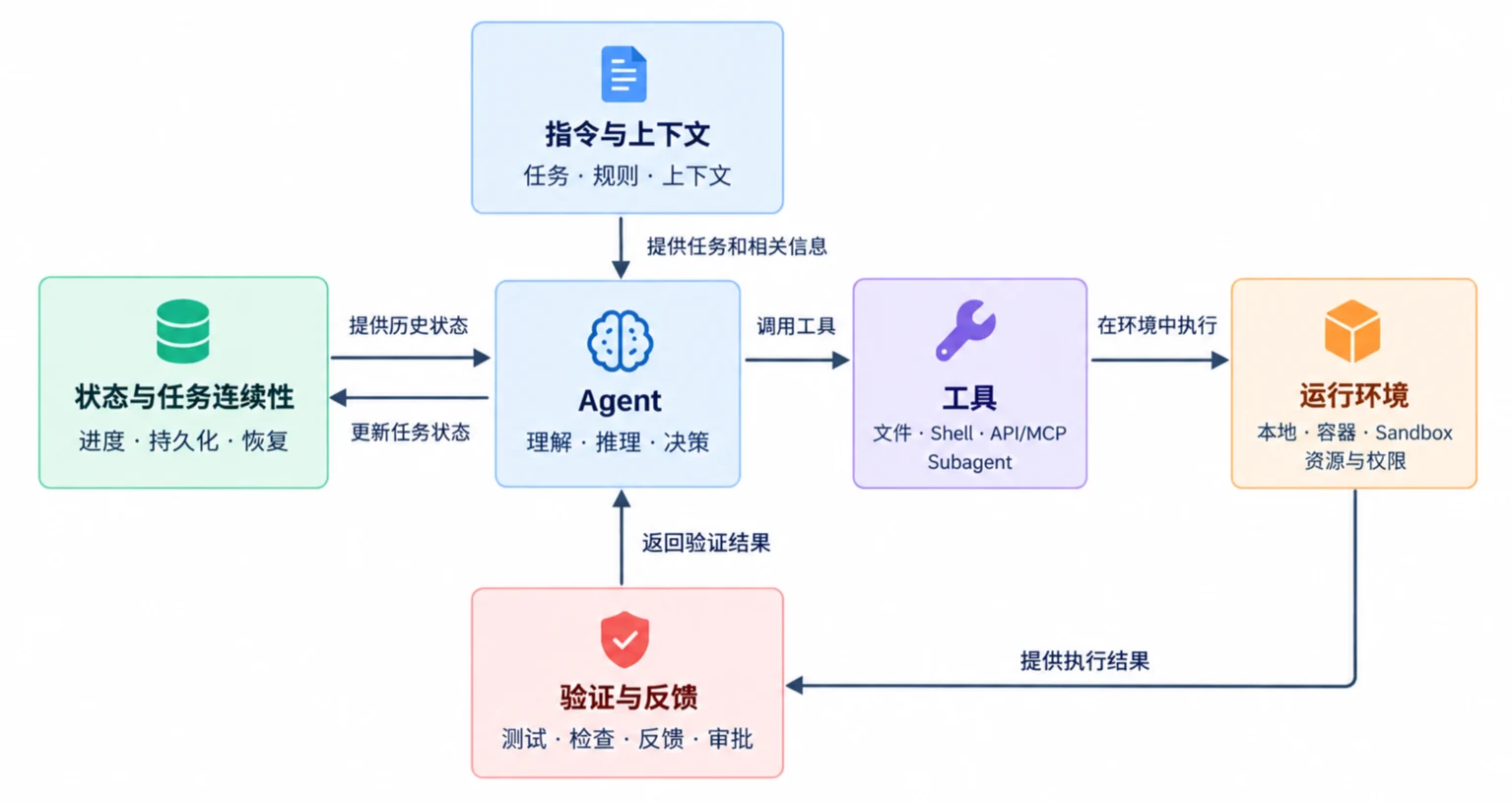
Harness has no single implementation approach. Different Agent systems provide different operating mechanisms based on task types. From the perspective of problems that need to be solved during actual Agent operation, Harness can be summarized into five coordinated parts: Instructions and Context, Tools, Runtime Environment, State and Task Continuity, and Validation and Feedback.
1) Instructions and Context
Instructions and Context determine what the Agent "knows" and "should follow" in the current task.
Instructions include not only the user's current input but also system prompts, project rules, code standards, business constraints, task boundaries, and completion conditions. For example, a coding Agent can understand directory structure, development standards, testing methods, and areas that cannot be modified through AGENTS.md, CLAUDE.md, or project documentation.
Context refers to effective information provided to the model during execution, including user requirements, historical operations, file contents, tool execution results, and current task state. Due to limited model context windows, Harness usually needs to select, compress, and reorganize context so the model receives only the information actually needed for the current task, rather than simply appending all historical content.
For complex tasks, layered instructions and progressive context loading can be used. For example, first have the Agent read the overall project description, then load local rules for a specific module when entering it. When task execution time is long and context keeps growing, earlier processes can be compressed, retaining only key conclusions, task state, and information still needed later. Through these mechanisms, effective information can be continuously provided to the Agent within limited context windows, while instructions constrain the Agent's task scope and behavioral boundaries.
2) Tools
The large model itself mainly handles understanding, reasoning, and generating decisions. To actually read external information or perform specific operations, tools are needed. Therefore, tools determine which operations an Agent can actually perform.
For coding Agents, common tools include file reading, file modification, code search, Shell command execution, Git operations, and testing tools. For enterprise Agents, they might include database queries, knowledge base retrieval, browsers, business APIs, and external systems connected through MCP.
At this layer, Harness doesn't just maintain a tool list. It also handles tool descriptions, parameter organization, call routing, execution result returns, and exception handling. For example, after the large model decides to "run project tests," Harness needs to call the corresponding tool, execute the test command in the specified environment, and then organize standard output, error messages, and exit status before returning them to the model, enabling the Agent to decide the next action based on execution results.
Tool calling requires corresponding security and permission controls. Some tools can only read files, while others can modify content. For operations involving file deletion, network access, system command execution, or production system operations, restrictions can be applied based on risk level, with human confirmation required when necessary. Mechanisms like Hooks can also be inserted before and after tool calls to check parameters, record execution processes, or block non-compliant operations.
In systems supporting Subagents, the main Agent can also delegate parts of tasks to specialized Subagents. For example, relatively independent work like code search, test analysis, or material organization can be assigned to different Subagents, with their results aggregated. This can expand a single Agent's task processing capability and reduce the pressure of concentrating complex tasks in a single execution context.
3) Runtime Environment
While tools answer "what an Agent can do," the Runtime Environment determines "where these operations happen."
For coding Agents, the runtime environment might be local project directories, containers, virtual machines, cloud sandboxes, or independent Git worktrees. The Agent reading and modifying files, executing Shell commands, installing dependencies, and running tests all depend on the specific runtime environment.
Harness needs to prepare and manage the runtime environment, such as initializing code repositories, installing dependencies, setting environment variables, starting necessary services, and checking whether the current environment meets task execution conditions. For long-running tasks, it also needs to prevent issues like missing dependencies, abnormal services, or inconsistent resource states during execution.
Environment isolation is also an important aspect of runtime environment management. If multiple Agents or tasks process the same project simultaneously, directly operating in the same working directory could cause file overwrites and state conflicts. Independent sandboxes, containers, or worktrees can be established for different tasks, allowing them to run in relatively isolated spaces. Even if a task fails, the impact on other tasks and the host environment can be minimized.
The runtime environment also controls resource access boundaries. For example, restricting the Agent to access only specified directories, connect only to specific networks, not read sensitive system files, or configuring different access credentials for different tasks. Tools define what capabilities an Agent can use, while the runtime environment limits which files, processes, networks, and system resources these capabilities can actually affect.
4) State and Task Continuity
A single large model invocation inherently lacks long-term task state, while complex Agent tasks may last for tens of minutes, hours, or even span multiple sessions. If task information only exists in the current context, once the context is compressed, the process is interrupted, or the session is restarted, the Agent may be unable to accurately determine what work has been completed.
Harness needs to maintain task state, including current goals, task decomposition results, completed steps, steps being processed, modified files, important tool execution results, and what needs to be continued.
This state can be stored in memory or written to task files, databases, Git history, or other external storage. For long-running Agents, persistent state is especially important. New Agent sessions can read previously saved task progress and key results, resuming from the last interruption point without re-analyzing the entire task.
State management runs through the entire task lifecycle. At task start, initial state is established. During execution, progress and key results are continuously recorded. After task completion, final state is saved. If a task is interrupted due to exceptions, timeouts, or system restarts, it can be resumed to the previous execution point through mechanisms like checkpoints. For complex tasks involving Subagents, the completion status, execution results, and interdependencies of each sub-task can be recorded.
The focus of State and Task Continuity is maintaining a continuously updated, persistent, and recoverable task execution process, enabling Agents to know where the task stands during long-running or cross-session execution.
5) Validation and Feedback
An Agent performing an operation does not mean the task has been correctly completed. For example, the Agent successfully modified a code file, but the code might not compile. A report was generated, but it might be missing key data. A business API call succeeded, but the result might not conform to business rules. Therefore, Harness also needs to establish validation and feedback mechanisms to check execution results and provide the results back to the Agent.
Validation methods depend on specific tasks. For software development, unit tests, linting, type checking, compilation, and end-to-end tests can be used. For business tasks, business rule checks, result comparison, or independent evaluators can be used. The core of validation is providing checkable criteria for task completion, rather than relying solely on the model's own judgment that "the task is complete."
Feedback provides validation results back to the Agent. For example, after a test fails, Harness can return error messages and related logs to the model. The Agent then analyzes the cause, modifies code, and re-tests based on this information, forming an "execute → validate → get feedback → modify → re-validate" loop. This closed loop enables the Agent to continuously correct previous decisions based on actual execution results, rather than ending the task after a single operation.
Harness can also add execution control in this process. For example, code commits may only be allowed after all tests pass. After consecutive execution failures, the task may be stopped or handed over to humans. For high-risk operations like production environment modifications or data deletion, the task can be paused before actual execution and human approval requested. Execution continues after confirmation, or the operation is terminated or adjusted without confirmation.
These five parts jointly support the Agent's continuous operation: Instructions and Context provide task goals, rules, and necessary information. Tools provide actual action capabilities. Runtime Environment carries these operations and defines resource boundaries. State and Task Continuity records task progress and supports recovery. Validation and Feedback checks execution results and drives the Agent to continue correcting or finishing tasks. Through these mechanisms, Harness organizes individual model invocations into a complete task process capable of continuous execution, constrained operation, and verifiable results.
Harness and Agent Relationship
Agent and Harness are not two mutually replaceable concepts but exist at different levels. During Agent operation, the large model is mainly responsible for understanding tasks, analyzing current information, and deciding next actions. Harness provides support around the Agent including Instructions and Context, Tools, Runtime Environment, State Management, and Validation Feedback, enabling the Agent's decisions to be truly executed while being constrained and checked during execution.
The relationship between the two can be described as "decision-making and execution support." The Agent judges what to do next based on current tasks and available information. Harness provides the tools and environment needed to complete this operation, and records the state and results generated during execution. After execution completes, Harness can also validate results through testing, rule checking, and other methods, then providing feedback to the Agent. The Agent makes further decisions based on new state and feedback, continuing this cycle until task completion conditions are met.
For example, a coding Agent determines it needs to modify login.py and run tests. Analyzing the code and deciding how to modify it primarily relies on the large model's understanding and reasoning capabilities. But whether login.py can be modified, where to read the file, which tool to use for modification, which sandbox to run the test command in, how to save modification progress, how to check test results, and how to continue execution after failure all require Harness to provide corresponding operating mechanisms. After a test fails, error messages are returned to the Agent, which analyzes the cause and decides the next modification plan.
The completeness of Harness affects what types of tasks an Agent can handle. A simple Harness may only provide a few tools and basic calling mechanisms, suitable for tasks with few steps. A more complete Harness can further provide context management, environment isolation, task state persistence, permission control, automatic validation, failure recovery, and human approval mechanisms, enabling Agents to continuously execute longer, more complex tasks. Even with the same large model, different Harnesses providing different operating conditions can result in significant differences in the Agent's execution capability and stability for complex tasks.
There is some overlap between Harness and Agent frameworks, as both involve tool invocation, context management, state management, and task execution control. However, their focus differs. Agent frameworks lean more toward providing development capabilities for Agent construction and task organization, such as Agent definition, tool invocation, state management, workflow orchestration, and multi-Agent collaboration. Harness focuses more on the support and control mechanisms built around Agent operation, such as how to organize context, provide tools and runtime environments, maintain task continuity, and validate execution results. As Agent frameworks and Agent SDKs continue to develop, some Harness capabilities are also being integrated into frameworks or SDKs, so there is no absolute functional boundary between them in specific implementations.
Overall, the relationship between the three can be summarized as: Large models provide intelligence, Agents organize decisions, and Harness ensures execution.
As the complexity of tasks executed by Agents increases, the role of Harness becomes more prominent.
DeepSeek Harness
Using DeepSeek Harness as an example, let's further understand how Harness is organized in actual Agent systems.
DeepSeek Harness is an open-source Agent Harness released by DeepSeek in 2026. Its characteristic is organizing the tools, Skills, sessions, sandboxes, and task execution capabilities needed for model operation through a plugin-based architecture, providing scalable runtime support for Agents.
DeepSeek understands a runnable Agent as:
Agent = Model + Harness
Where the Model is responsible for understanding tasks and making decisions, and Harness organizes the tools, context, and execution environment the model needs to complete tasks.
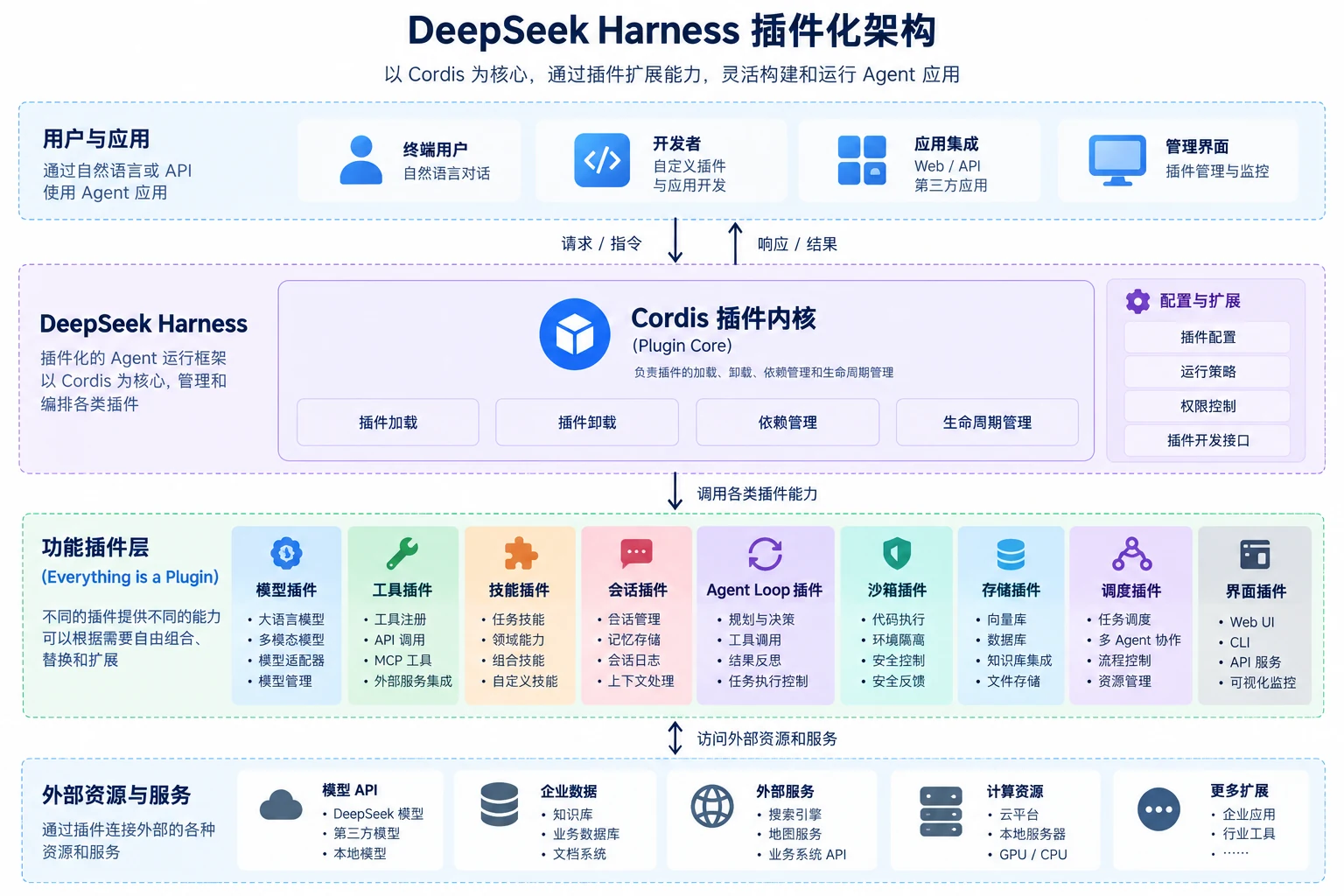
DeepSeek Harness's core design is "Everything is a Plugin." Capabilities like models, tools, Skills, sessions, sandboxes, storage, execution loops, task scheduling, and sub-Agents can all be provided through plugins, organized by the underlying Cordis plugin system. Cordis handles plugin loading, unloading, dependency management, and lifecycle management, while specific Agent capabilities are provided by different plugins. Developers can combine, replace, or extend different plugins based on actual needs.
The overall plugin-based architecture is shown below.
For example, using DeepSeek Harness to build a data analysis Agent. The Agent reads user-provided data files, calls corresponding tools for data processing and analysis based on the task, and can also use Skills for specific data analysis tasks. If the task is complex, some work can be delegated to Subagents. The model handles judging what operation needs to be done next, while Harness provides and organizes the capabilities needed to complete these operations.
In addition to plugin-based design, DeepSeek Harness also provides session and execution recording mechanisms. Information like system prompts, tool calls and their results, Subagent scheduling, and context injection seen by the model can be recorded in session logs and viewed through Trajectory. Based on these records, tasks can be recovered, branched, retrieved, and replayed, helping developers observe and debug the Agent's execution process.
Currently, DeepSeek Harness is still in the Developer Preview stage, with its core plugins and API still under continuous iteration. Therefore, it is better understood as a representative case for understanding Harness plugin-based design and engineering implementation, rather than treating current interfaces as fixed development standards.